0 ratings


Articol nr.:
88985437
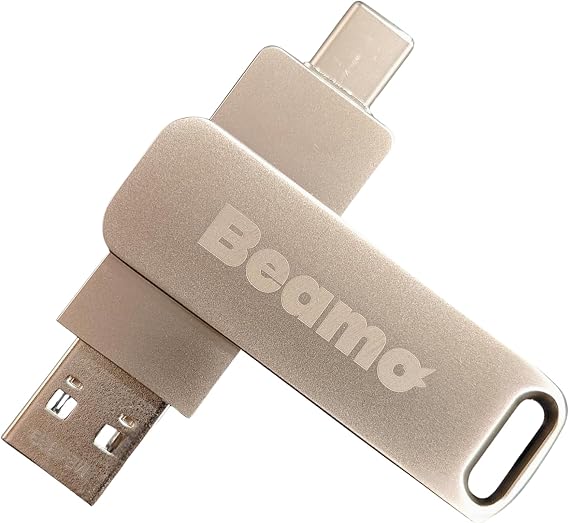
Beamo Linux Mint Cinnamon 22.3 (Most Recent Version) 64-bit Bootable USB Flash Drive, Live USB for Installing and Repairing Linux Mint
Articol nr.:
88985437
RON 141
Price Details
Excluding Shipping & Custom charges ( Shipping and custom charges will be calculated on checkout )
*All items will import from SUA
0 ratings
Scrieți o recenzie
În stoc
 Importat din USA
QTY:
Comandați acum și primiți Joi, Iulie 23
Secured transaction
Ubuy works hard to protect your security and privacy. Our advanced payment security system ensures confidentiality by encrypting your information during transmission using AES (Advanced Encryption Standards) and SSL (Secure Socket Layer) protocols. Your payment details are 100% secure as we do not share your payment details with third party sellers.
partenerii noștri principali de logistică


Easily start your computer from the USB flash drive and install Linux Mint directly onto your hard drive without any hassle.

Fast
Shipping

Retur
gratuit*

Ambalaj sigur

Produse originale 100%

PCI DSS Compliance

ISO 27001 Certified


Note: Step Down Voltage Transformer required for using electronics products of SUA store (110-120). Recommended power converters Cumpărați Acum.


What Stands Out
Live USB Capabilities
Easily run Linux Mint Cinnamon 22.1 without installation. Perfect for testing features and functionality on your hardware before full installation.
Bootable Convenience
Transform any USB flash drive into a bootable installation media. Simplifies the process of installing or repairing Linux Mint for users of all skill levels.
64-Bit Performance
Optimized for 64-bit systems, ensuring better performance and access to more memory, making it ideal for modern hardware setups.
Detalii produs
| Item Weight | 0.1 lbs (50 grams) |
Who Should Buy?

-
New Linux Users
Ideal for beginners looking to install or repair Linux Mint easily without complex procedures.
-
Tech Enthusiasts
Great for hobbyists who want a portable Linux environment for testing and experimentation.
-
System Administrators
Useful for professionals needing a quick recovery or installation tool in IT support situations.

-
Windows Users
Not suitable for those exclusively using Windows, as it’s designed for Linux environments.
-
Limited Hardware
Users with older hardware may experience performance issues when running Linux Mint from a USB.
-
Non-Technical Users
Individuals unfamiliar with installing or using operating systems might find it challenging and confusing.
DESCRIEREA PRODUSULUI
Beamo Linux Mint Cinnamon 22.3 (Most Recent Version) 64-bit Bootable USB Flash Drive, Live USB for Installing and Repairing Linux Mint
Aveți Întrebări? Discutați cu noi
Întrebări și răspunsuri ale clienților
-
întrebare:
What is Beamo Linux Mint Cinnamon 22.1 Bootable USB?
Răspuns: Beamo Linux Mint Cinnamon 22.1 Bootable USB is a pre-configured flash drive that contains the latest version of Linux Mint, allowing users to install or repair the operating system directly from the USB. This version features the Cinnamon desktop, known for its user-friendly interface and rich customization options. It is ideal for users transitioning from other operating systems or those who need a reliable tool for system recovery, providing a hassle-free setup process. -
întrebare:
How do I use the Beamo Linux Mint USB flash drive?
Răspuns: To use the Beamo Linux Mint USB flash drive, simply plug it into your computer's USB port and boot from the USB device. Most computers allow you to access the boot menu by pressing a specific key during startup, such as F12 or ESC. Once booted, you can either try Linux Mint in Live mode or proceed with the installation. This is particularly useful for users looking to test Linux Mint without modifying their current operating system. -
întrebare:
Can I run Beamo Linux Mint directly from the USB drive?
Răspuns: Yes, Beamo Linux Mint can be run directly from the USB drive in Live mode. This allows you to experience the full functionality of the operating system without installing it on your hard drive. It’s an excellent option for troubleshooting or using Linux Mint on multiple computers without permanent installation. Users often leverage this feature to access their files securely or test the operating system's compatibility with their hardware before making a full installation. -
întrebare:
Is Beamo Linux Mint suitable for beginners?
Răspuns: Absolutely! Beamo Linux Mint, especially the Cinnamon edition, is designed with user-friendliness in mind. Its intuitive interface resembles traditional desktop environments, making it easier for beginners transitioning from Windows or macOS. The inclusion of common applications and simplified settings helps new users navigate and utilize functions effectively. Many users start with the Live mode to familiarize themselves with the environment without committing to a full installation, providing a perfect learning experience. -
întrebare:
Can I use Beamo Linux Mint to recover a broken system?
Răspuns: Yes, Beamo Linux Mint is a practical tool for system recovery. If your primary operating system fails to boot, you can use the USB to access your files or perform repairs. The Live session provides access to disk management tools and system diagnostics. Users often utilize this capability to back up important data to another drive or to reinstall the OS, making it a reliable solution for unexpected system failures. -
întrebare:
What are the system requirements for Beamo Linux Mint 22.1?
Răspuns: Beamo Linux Mint 22.1 has relatively modest system requirements, making it accessible to a wide range of hardware. Typically, you’ll need a minimum of 2 GB of RAM, although 4 GB or more is recommended for optimal performance. A 64-bit processor is essential to take full advantage of the features. Users can revitalize older computers, enhancing performance and usability by installing Linux Mint, which is why it's popular among those with legacy hardware. -
întrebare:
What features does Linux Mint Cinnamon 22.1 offer?
Răspuns: Linux Mint Cinnamon 22.1 offers a plethora of features, including a modern user interface, multiple desktop environments, software management tools, and numerous pre-installed applications like LibreOffice and Firefox. Furthermore, advanced customization options let users tailor their desktop to their unique preferences, fostering a personalized computing experience. This diverse feature set appeals to both new users and seasoned Linux aficionados seeking flexibility and control. -
întrebare:
Is Beamo Linux Mint USB flash drive compatible with all computers?
Răspuns: Yes, the Beamo Linux Mint USB flash drive is compatible with any computer that supports booting from USB. This includes both Windows and Mac systems as well as various distributions of Linux. Users often use this compatibility to assess how Mint operates across different hardware configurations before deciding on permanent installations, ensuring they get the best performance tailored to their needs. -
întrebare:
Where can I buy Beamo Linux Mint Cinnamon 22.1 Bootable USB Flash Drive?
Răspuns: You can purchase Beamo Linux Mint Cinnamon 22.1 Bootable USB Flash Drive from Ubuy in Romania. Ubuy provides a seamless shopping experience, along with detailed product information that helps you make informed decisions. It's a reliable source for tech products, making it easier to obtain your Linux Mint USB and start enjoying the benefits of this operating system. -
întrebare:
What types of users benefit from Beamo Linux Mint?
Răspuns: Beamo Linux Mint appeals to various user groups including casual users, developers, students, and system administrators. Casual users enjoy its simplicity and ease of use while developers appreciate the robust environment for software development. Students can utilize Linux Mint for educational purposes, and system administrators often leverage the Live USB for troubleshooting and maintenance tasks across multiple systems, making it an invaluable tool in diverse scenarios.
Beamo USB Flash Drives Editorial Review
** Beamo Linux Mint Cinnamon 22 Bootable USB Flash Drive** The Beamo Linux Mint Cinnamon 22 Bootable USB Flash Drive has garnered a range of feedback from customers, highlighting both the positives of the product as well as some notable downsides. Users have praised the installation process for being straightforward and effective, with many noting that it worked seamlessly when setting up devices like Bluetooth and connecting to networks. For individuals looking to breathe new life into aging laptops, this USB drive has proven to be an invaluable tool, allowing them to transition from older operating systems to a more modern Linux environment effortlessly. Many users have expressed satisfaction with the performance of Linux Mint, citing its speed advantages over Windows. They found the ability to perform installations without extensive input refreshing, allowing those with basic technical skills to navigate the process with ease. Moreover, it has been highlighted as a cost-effective solution for data recovery from obsolete systems, with one customer sharing a personal success story of retrieving important files from a backup drive with the help of this product. However, the product is not without its flaws. Customer feedback has also identified significant issues with product Consistency, particularly related to receiving non-functional or empty USB drives. This inConsistency raises concerns about quality control and the reliability of the product. While some users received operational drives, others faced the disappointment of receiving faulty ones, rendering the effort to utilize the service futile. Additionally, there were mentions of a lack of support from the company, which may discourage less experienced users who could benefit from a bit of guidance during the installation process. In summary, while the Beamo Linux Mint Cinnamon Bootable USB Flash Drive can deliver a valuable experience to users seeking to upgrade and maintain older machines, the inConsistency in product quality and support leaves room for improvement. **
Recenziile și evaluările clienților
1 evaluări ale clienților
-
5 stele
100%
-
4 stele
0%
-
3 stele
0%
-
2 stele
0%
-
1 stele
0%
Faceți o recenzie pentru acest produs
Spuneți-vă părerile și altor clienți
Pro
- Easy installation and seamless operation
- Quick setup for devices and network connections
- Enhanced performance with a modern Linux environment
- Cost-effective solution for reviving older laptops
- Successful data recovery capabilities
Contra
- InConsistent quality control leading to some non-functional drives
Istoric de Preț al Produsului
Important
- Limite: Pentru produsele expediate la nivel internațional, vă rugăm să rețineți că este posibil ca garanția producătorului să nu fie valabilă; este posibil ca opțiunile de service ale producătorului să nu fie disponibile; este posibil ca manualele, instrucțiunile și avertismentele de siguranță ale produsului să nu fie în limba țării de destinație; este posibil ca produsele (și materialele însoțitoare) să nu fie proiectate în conformitate cu standardele, specificațiile și cerințele privind etichetarea din țara de destinație; este posibil ca produsele să nu fie conforme cu voltajul și cu alte standarde electrice din țara de destinație (necesitând utilizarea unui adaptor sau convertor, dacă este cazul). Destinatarul este responsabil pentru asigurarea faptului că produsul poate fi importat legal în țara de destinație. Când comandați de pe Ubuy sau de la afiliații acestuia, destinatarul este importatorul înregistrat și trebuie să respecte toate legile și reglementările din țara de destinație
- Nu toate produsele listate pe Ubuy sunt de vânzare, deoarece Ubuy este un motor de căutare global. Produsele sunt supuse reglementărilor privind exportul/comerțul.
RON 141
Comandați acum și primiți Joi, Iulie 23
This item is not restrict in my country.(Please click on above link if this item is not restrict in your country, So our team will review and allow.)
QTY:
Secured transaction
Ubuy works hard to protect your security and privacy. Our advanced payment security system ensures confidentiality by encrypting your information during transmission using AES (Advanced Encryption Standards) and SSL (Secure Socket Layer) protocols. Your payment details are 100% secure as we do not share your payment details with third party sellers.
partenerii noștri principali de logistică
Cea mai rapidă livrare transfrontalieră
Caracteristici și avantaje
- Pre-loaded with the latest Linux Mint Cinnamon 22.
- Compatible with almost all modern computers, ensuring easy installation.
- User-friendly environment designed for all skill levels.
- 16GB storage capacity for installations and future uses.
- Plug-and-play functionality for a hassle-free experience.
- Reliable performance with a high-quality Beamo USB flash drive.