0 ratings


Articol nr.:
220515945
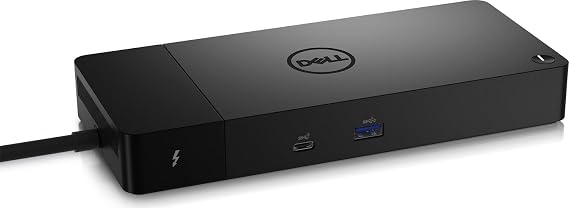
Dell ThunderBolt 4 Dock (WD22TB4), Black
78% din respondenți l-ar recomanda unui prieten
Articol nr.:
220515945
RON 1036
Detalii preț
Excluzând taxele de transport și vamale ( Taxele de transport și vamale vor fi calculate la finalizarea comenzii )
*Toate articolele vor fi importate din SUA
0 ratings
Scrieți o recenzie
În stoc
 Importat din USA
Cant.:
Comandați acum și primiți Joi, Septembrie 24
Tranzacție securizată
Ubuy depune eforturi pentru a vă proteja securitatea și confidențialitatea. Sistemul nostru avansat de securitate a plăților asigură confidențialitatea prin criptarea informațiilor dvs. în timpul transmisiei folosind protocoalele AES (Advanced Encryption Standards) și SSL (Secure Socket Layer). Detaliile dvs. de plată sunt 100% sigure, deoarece nu partajăm datele dvs. de plată cu vânzători terți.
Partenerii noștri principali de logistică


Multiply Productivity: Connect displays and peripherals to your system with a single cable for ultimate productivity.

Fast
Shipping

Retur
gratuit*

Ambalaj sigur

Produse originale 100%

PCI DSS Compliance

ISO 27001 Certified



Note: Step Down Voltage Transformer required for using electronics products of SUA store (110-120). Recommended power converters Cumpărați Acum.


Ce Iese în evidență
Versatile Connectivity
The Dell ThunderBolt 4 Dock WD22TB4 offers multiple ports including USB-C, USB-A, HDMI, and Ethernet, ensuring seamless connectivity to a variety of devices for home or office use.
High-Speed Data Transfer
With Thunderbolt 4 technology, this dock enables data transfer speeds of up to 40 Gbps, allowing users to quickly transfer large files and enhance productivity without lag.
Dual 4K Display Support
Supports dual 4K displays, enabling an expansive workspace for multitasking and improved efficiency, making it ideal for graphic designers, video editors, and professionals needing high-resolution output.
Detalii produs
| Package Weight | 4.34 Pound |
Cine Ar Trebui să Cumpere?

-
Remote Workers
Ideal for remote workers needing multiple connectivity options for laptops, enhancing productivity and workspace organization.
-
Content Creators
Great for video editors and graphic designers requiring high data transfer speeds and multiple display support.
-
Gamers
Designed for gamers using laptops, offering fast data transfer and multiple peripherals support for an enhanced gaming experience.

-
Casual Users
Not suitable for casual users needing only basic connectivity, as features may be excessive for their requirements.
DESCRIEREA PRODUSULUI
Dell ThunderBolt 4 Dock (WD22TB4), Black
Aveți întrebări? Discutați cu noi
Întrebări și răspunsuri ale clienților
-
Întrebare:
What devices are compatible with the Dell ThunderBolt 4 Dock WD22TB4?
Răspuns: The Dell ThunderBolt 4 Dock WD22TB4 is designed to work with Thunderbolt 4 and USB-C compatible laptops, including models from major brands like Dell, HP, and Lenovo. Additionally, it offers backward compatibility with Thunderbolt 3 devices and USB-C peripherals. This dock is ideal for users who require a versatile hub to connect multiple monitors, external storage, and other peripherals, making it perfect for home office setups or professional workstations. -
Întrebare:
How many displays can I connect to the Dell ThunderBolt 4 Dock WD22TB4?
Răspuns: You can connect up to two 4K displays at 60Hz or a single 8K display at 30Hz using the Dell ThunderBolt 4 Dock WD22TB4. This capability makes it a robust choice for graphic designers, video editors, and multitaskers who rely on high-resolution displays for productivity. Whether you're managing multiple applications for work or enjoying a cinematic experience at home, this dock provides the required video output versatility. -
Întrebare:
Does the Dell ThunderBolt 4 Dock WD22TB4 support power delivery?
Răspuns: Yes, the Dell ThunderBolt 4 Dock WD22TB4 supports power delivery, allowing you to power your compatible laptop while simultaneously connecting peripherals. With up to 90W power delivery, you can keep your device charged during heavy usage, making it perfect for professionals who need to maintain productivity throughout the day. This feature also reduces cable clutter on your desk since you won't need a separate charger for your laptop. -
Întrebare:
Can the Dell ThunderBolt 4 Dock WD22TB4 be used with non-Dell devices?
Răspuns: Absolutely! While the dock is optimized for Dell laptops, it is compatible with any Thunderbolt 4 or USB-C device from other manufacturers. This flexibility allows users of various brands to benefit from its extensive connectivity options, including power delivery and multi-display support. It’s an excellent investment for users who own multiple devices or are frequently upgrading their laptops. -
Întrebare:
What ports does the Dell ThunderBolt 4 Dock WD22TB4 feature?
Răspuns: The Dell ThunderBolt 4 Dock WD22TB4 includes a wide range of ports: dual Thunderbolt 4 ports, USB-A 3.2 Gen 2, USB-C, an HDMI 2.0, Ethernet, and a 3.5mm audio jack. This diverse array of connectivity options is designed to support multiple peripherals simultaneously, making it ideal for users who need greater connectivity without sacrificing performance. Whether you're connecting external hard drives or an array of input devices, this dock has you covered. -
Întrebare:
Is the Dell ThunderBolt 4 Dock WD22TB4 compatible with Mac systems?
Răspuns: Yes, the Dell ThunderBolt 4 Dock WD22TB4 is compatible with Mac systems that support Thunderbolt 3 or 4. Mac users can enjoy high-speed data transfer, video output, and charging capabilities with this dock. This makes it particularly beneficial for creative professionals using macOS who seek to enhance their workspace with multiple displays and peripherals. -
Întrebare:
What are the dimensions and weight of the Dell ThunderBolt 4 Dock WD22TB4?
Răspuns: The Dell ThunderBolt 4 Dock WD22TB4 has compact dimensions, making it an ideal addition to any workspace. It weighs approximately 1.5 kg, making it portable enough to carry for on-the-go professionals. The sleek design ensures that it fits seamlessly into both home and office environments, allowing users to maintain a tidy workspace while maximizing connectivity and functionality. -
Întrebare:
How does the Dell ThunderBolt 4 Dock WD22TB4 improve productivity?
Răspuns: The Dell ThunderBolt 4 Dock WD22TB4 enhances productivity by allowing users to connect multiple devices easily, reducing cable clutter while providing power delivery to your laptop. With its ability to support dual 4K monitors, users can multitask efficiently, whether it’s for presentations, coding, or graphic design. The dock serves as a central hub, streamlining workflow for busy professionals. -
Întrebare:
What cooling features are available with the Dell ThunderBolt 4 Dock WD22TB4?
Răspuns: The Dell ThunderBolt 4 Dock WD22TB4 is designed with effective ventilation systems to prevent overheating during prolonged use. It is built to dissipate heat efficiently even when supporting high data transfer rates or powering multiple devices simultaneously. This ensures peak performance without interruptions, providing reliability for users who depend on the dock during intense work sessions. -
Întrebare:
Where can I buy Dell ThunderBolt 4 Dock WD22TB4 in Romania?
Răspuns: You can buy the Dell ThunderBolt 4 Dock WD22TB4 at Ubuy. They offer a great selection of technology products, including this dock, ensuring that you can find the right solution for your connectivity needs. Ubuy provides a user-friendly shopping experience, allowing you to compare features and read customer reviews before making a decision.
Dell Docking Stations Editorial Review
The Dell U4323QE monitor has garnered a mixed reception from customers, particularly concerning its built-in USB-C hub capabilities and performance with various devices. Many users initially expected the hub to serve as a seamless docking solution for multiple peripherals, only to find it lacking in power. Specifically, the device connection issues—where peripherals frequently lost connectivity—were a significant pain point for those attempting to work with high-demand setups that included gaming gear, audio interfaces, and multiple monitors. For those using the monitor with supported systems, like Dell laptops, there are notable benefits, such as the ability to charge laptops and control power settings directly through the dock. One user emphasized that the Dell dock was the only one capable of supporting dual 4K displays at 60Hz, highlighting compatibility as a strong positive aspect of the product. For Ubuntu users, however, there were significant concerns regarding firmware updates and device compatibility, leading some to label their experience as frustrating. Aside from connectivity and compatibility issues, several testimonials pointed to thermal management problems with the monitor, like excessive fan noise that could deter use in quiet settings. Some customers even encountered hardware failures, leading to dissatisfaction with customer service response time and support options, especially when purchased through third-party sellers. Overall, while the Dell U4323QE monitor has users who appreciate its capabilities in the right environment, many recommend thorough research before purchase, particularly regarding power needs and compatibility with existing devices. Customers feel that while the monitor has potential, it does require careful Consideration to avoid the pitfalls they encountered. **
Recenziile și evaluările clienților
1 evaluări ale clienților
-
5 stele
100%
-
4 stele
0%
-
3 stele
0%
-
2 stele
0%
-
1 stele
0%
Faceți o recenzie pentru acest produs
Împărtășiți-vă părerea cu alți clienți
Pro
- Supports multiple monitors and devices simultaneously.
- Ideal for charging Dell laptops with specific features for Dell models.
- Successfully drives dual 4K displays at 60Hz for some users.
- Useful for closing laptops while maintaining a multi-monitor setup.
Contra
- Software and firmware difficulties, especially for Ubuntu users.
ÎNCREDERE ÎN PLATFORMĂ ȘI SIGURANȚA CUMPĂRĂTORULUI

JK
Jasmin
Cumpărător verificat
“Great products and very good service: very easy and very fast international delivery.”
9 September 2026 · via Trustpilot
AG
Anke
Cumpărător verificat
“Wonderful online shopping experience, smooth transaction from the start. Payment method works conveniently and delivery is unexpectedly fast and reliable. You go the extra mile for service. What makes this even more amazing, you deliver to Namibia. I will remain a happy Ubuy customer and will increase my purchases for sure! Thank you!”
10 September 2026 · via Trustpilot
H
Hazel
Cumpărător verificat
“Very easy to find the products what you need, and so fast delivery, that’s why I highly recommended to others costumers to used ubuy.”
10 September 2026 · via Trustpilot
O
Opaleye
Cumpărător verificat
“I received exactly what I ordered I was skeptical about your site because that was my first time to order. But the order came timely and neatly packaged. I was not disappointed. Thank you.”
11 September 2026 · via Trustpilot
AC
Adele
Cumpărător verificat
“Easy to find and order what you want on the website. Delivery is quick to the UK”
8 September 2026 · via Trustpilot
Checkout securizat
Livrare internațională
Returnări ușoare
Produse originale
Istoricul prețului produsului
Important
- Limitări: Pentru produsele expediate la nivel internațional, vă rugăm să rețineți că este posibil ca garanția producătorului să nu fie valabilă; este posibil ca opțiunile de service ale producătorului să nu fie disponibile; este posibil ca manualele, instrucțiunile și avertismentele de siguranță ale produsului să nu fie în limba țării de destinație; este posibil ca produsele (și materialele însoțitoare) să nu fie proiectate în conformitate cu standardele, specificațiile și cerințele privind etichetarea din țara de destinație; este posibil ca produsele să nu fie conforme cu voltajul și cu alte standarde electrice din țara de destinație (necesitând utilizarea unui adaptor sau convertor, dacă este cazul). Destinatarul este responsabil pentru asigurarea faptului că produsul poate fi importat legal în țara de destinație. Când comandați de pe Ubuy sau de la afiliații acestuia, destinatarul este importatorul înregistrat și trebuie să respecte toate legile și reglementările din țara de destinație
- Nu toate produsele listate pe Ubuy sunt de vânzare, deoarece Ubuy este un motor de căutare global. Produsele sunt supuse reglementărilor privind exportul/comerțul.
RON 1036
Comandați acum și primiți Joi, Septembrie 24
This item is not restrict in my country.(Please click on above link if this item is not restrict in your country, So our team will review and allow.)
Cant.:
Tranzacție securizată
Conform PCI DSS și certificat ISO 27001:2022, cu plăți criptate și protecție completă a cumpărătorului la fiecare comandă.
Partenerii noștri principali de logistică
Cea mai rapidă livrare internațională
Caracteristici și avantaje
- Modular design for easy upgrades with swappable modules.
- Features 2 x Thunderbolt-4 ports for high connectivity.
- Fast charging technology with SuperBoost capabilities.
- Supports multiple 4K displays and Thunderbolt peripherals.
- Data transfer speeds up to 40 GB/s for maximum efficiency.
- Compatible with Windows 10 and Windows 11 systems.
Asigurare Ubuy
Bucură-te de o experiență de cumpărare fără griji, cu produse 100% originale, securitate a plăților conformă cu standardul PCI DSS, protecție a datelor certificată ISO 27001, cea mai rapidă livrare internațională, retururi gratuite și ambalare securizată pentru fiecare comandă.*